Looking for an Anti-theft Pin code? Look no further!
When you install a head-unit in a different car, it gets locked, and you need an Anti-theft Pin code to unlock it. Obtaining an Anti-theft Pin code is easy:
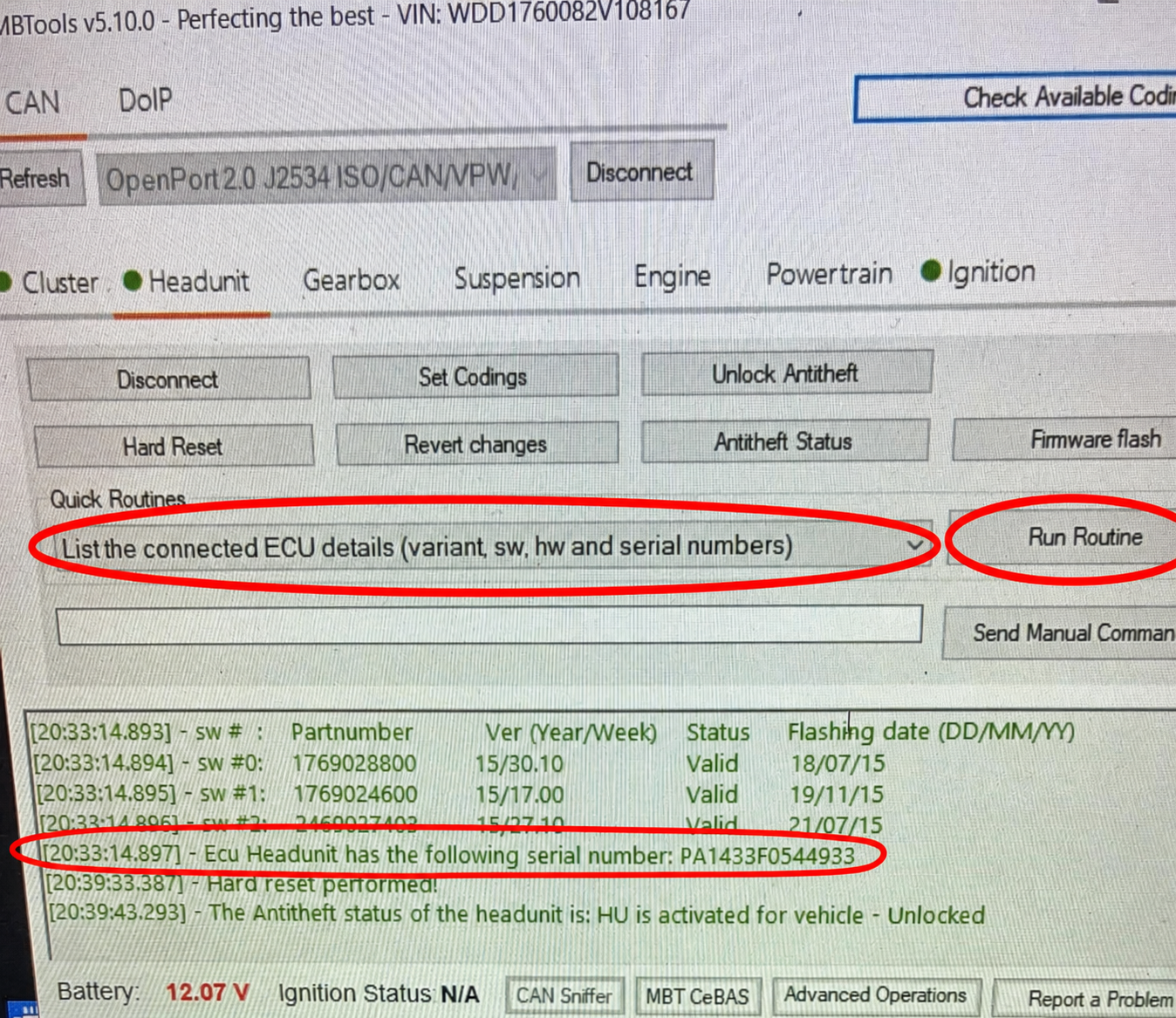
Get the headunit's serial number from its sticker or through OBD. In the MBTools app, open the Headunit tab, select "List the connected ECU details (variant, sw, hw and serial numbers)" from Quick Routines, and click Run Routine.
Search for the Anti-theft Pin code here, and use it to unlock the head-unit by the MBTools app/Vediamo/DTS/Xentry, using an OBD Diagnostic device.
After a match is found, a confirmation email containing the Anti-theft Pin code will also be sent.
Please keep in mind:
You are paying us to search for your Anti-theft Pin code in various databases.
The code is not generated or calculated. It is retrieved only if a match is found for the searched serial number.
You are guaranteed to obtain the same results, that you would typically get from dealership sources, just with much less hassle and paperwork.
If the head-unit has been reported stolen, a pin can not be obtained for it.
If a pin has not been found, the tokens will not be deducted, and you may reuse them for another search, either for correcting the serial number you searched with, or for a future car.
A refund is not available under any circumstances.
Search for your Anti-theft Pin code today for only 40 EUR · In stock
How to find out the serial number of your Mercedes headunit?
To determine your headunit's serial number, you have two options:
For the complete unlocking procedure, follow the Mercedes headunit antitheft unlock guide.
Recommended: connect with the MBTools app, open the Headunit tab, select "List the connected ECU details (variant, sw, hw and serial numbers)" from Quick Routines, and click Run Routine. The 14-character serial number will appear in the log.
If you cannot currently connect to the headunit, you can find the serial number on a physical sticker located on the top of the headunit.
Ensure that you have the correct serial number by adhering to the following criteria:
The serial number must consist of exactly 14 characters.
It will begin with one of the following sequences: 'AL', 'GA', 'HB', 'HM', 'ME', 'PA', 'VT', 'CO', 'CM'.
If you read the serial number from the sticker and it starts with 'BE', replace it with 'HB'.
If you are unable to identify the serial number on the sticker, that meets the specified criteria mentioned earlier, please use a diagnostic device to read the serial number directly from the headunit.
MBTools app method:
Physical label method:
