Unlock the Full Potential of Your Mercedes-Benz
From the factory, most Mercedes-Benz vehicles come with numerous hidden or disabled features. With MBTools, you can unlock these functions, customize your car’s performance, and elevate your driving experience—without complex hardware installations.
With our software-based solutions, you can:
- Enable the AMG Performance Menu
- Activate Apple CarPlay and Android Auto
- Perform suspension calibration
- Update firmware and navigation maps
- Renew or “virginize” instrument clusters
Whether you're a beginner or an advanced enthusiast, our comprehensive guides will walk you through every step.
Why Modify Your Mercedes-Benz?
Modern vehicles are packed with technology, but many of their features are disabled by default. Here's what coding can offer:
- Unlock hidden menus and advanced diagnostics
- Personalize the infotainment experience
- Improve vehicle performance and handling
- Avoid expensive dealer fees
- Take control with just a laptop and MBTools
Getting Started: Prerequisites
Set Up Your PC (Coming Soon)
A complete walkthrough on how to install the MBTools App on your computer and understand its main functions.
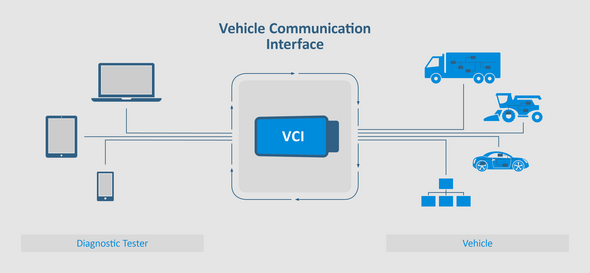
Set Up Your VCI (Vehicle Communication Interface)
Core Coding Guides
Enabling the AMG Menu
Learn how to activate the AMG Performance Menu, even if your vehicle wasn’t originally equipped with it.
Virginize/Renew an Instrument Cluster
Reset the instrument cluster and synchronize mileage to match the vehicle, essential when replacing or upgrading dashboards.
Mercedes Navigation Update
Keep your maps up to date using MBTools and avoid costly dealership updates.
Unlock a Mercedes Headunit in Antitheft Mode
Obtain the correct headunit PIN, run the MBTools unlock procedure, and verify that antitheft mode is cleared.
- Enabling Headunit Codings (Coming Soon)
- Suspension calibration (Coming Soon)
Add modern features like CarPlay, Android Auto, or even custom AMG boot logos to your infotainment system.
Learn how to adjust your car’s height for better aesthetics and improved aerodynamics using our calibration tools..
Advanced Mercedes Coding Guides
- Connecting to an Instrument Cluster on the Bench
- Firmware Flashing & Updates
- VCI Configuration for Advanced Use
- Xentry Diagnostics Guide (Coming Soon)
- Vediamo General Guide (Coming Soon)
- DTS Monaco Guide (Coming Soon)
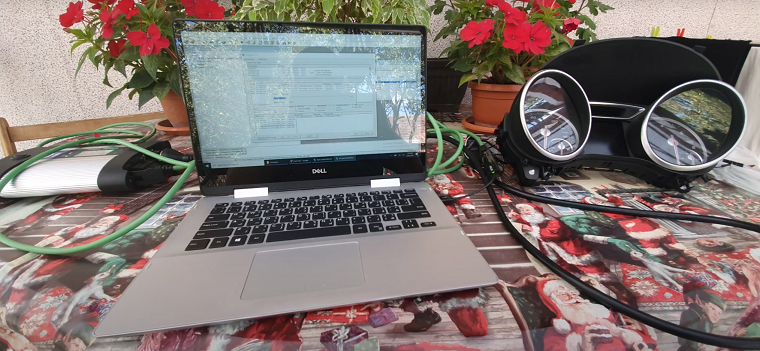
Understand how to set up a test-bench connection to work on ECUs outside the vehicle.
Learn how to update your vehicle's firmware using MBTools App, Vediamo or DTS Monaco safely and effectively.
Dive deeper into VCI setup, supported protocols, and ECU compatibility.
Understand the basics of using Xentry for troubleshooting and diagnostics.
Learn how to use Vediamo to code and calibrate control units in older Mercedes models.
A complete guide to DTS Monaco for coding and diagnostics on modern Mercedes-Benz vehicles.
Disclaimer
We are independent Mercedes-Benz enthusiasts and are not affiliated with Mercedes-Benz Group AG or any of their trademarks. Our tools and guides are developed to help users explore their vehicles’ full capabilities without relying solely on dealerships.
FAQs
Is it legal to code or modify my Mercedes-Benz?
In most countries, coding for personal use is legal, especially if it doesn't compromise emissions or safety features. Always check local regulations before proceeding.
Will coding void my Mercedes-Benz warranty?
Some coding changes may affect your warranty. It’s best to consult with your dealer beforehand if your vehicle is under warranty.
Do I need technical knowledge to use MBTools?
Basic computer skills are sufficient for most coding tasks. Our guides are beginner-friendly and walk you through each step.
What equipment do I need to start coding my Mercedes?
You’ll need a laptop, a compatible Vehicle Communication Interface (VCI), and the MBTools App.
Can I undo a coding change?
Yes, MBTools allows you to backup and restore settings, so you can revert any changes at any time.