Important Notice
This guide is intended for advanced users familiar with ECU removal, automotive electronics and safe wiring practices.
We are not liable for any damage caused by incorrect procedures, wiring mistakes or hardware misuse. Proceed at your own risk.
Introduction to ECU Bench Testing
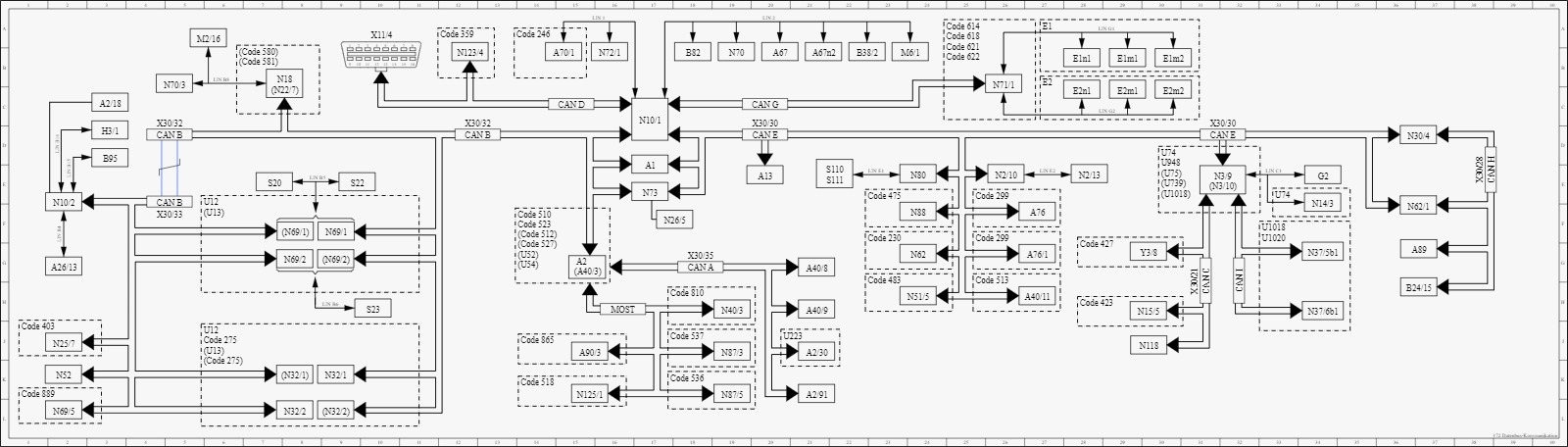
Modern vehicles use a Controller Area Network (CAN) to facilitate communication between electronic control units (ECUs). These systems are normally accessed through the OBD-II port using a Vehicle Communication Interface (VCI).
Mercedes-Benz vehicles have multiple CAN networks, typically:
- CAN B (Body CAN) – for interior and comfort systems
- CAN E (Chassis CAN) – for dynamic control systems
This guide focuses on bench testing Mercedes-Benz ECUs, meaning communicating with an ECU outside the vehicle, using an external power source and diagnostic tools.
Why Connect to an ECU on Bench?
Bench testing ECUs offers numerous advantages:
Benefits:
- Lower Power Draw: No need to power the full vehicle — ideal for long diagnostic sessionsNo need to power the full vehicle — ideal for long diagnostic sessionsNo need to power the full vehicle — ideal for long diagnostic sessions.
- Faster Communication: Isolate the ECU for faster firmware updates and flashing
- Cost efficiency: Avoid using full-vehicle power supplies or emulators.
- Portability: Easily test ECUs away from the vehicle, such as in workshops or development environments.
Prerequisites: What You Need
To successfully bench test Mercedes-Benz ECUs, you will need:
- VCI Device: Use a compatible Vehicle Communication Interface (VCI) like Tactrix Openport, Bosch C6 or VXDIAG.
- Windows Laptop: Windows 10 or newer, running software such as MBTools, Vediamo, DTS Monaco, or Xentry.
- Power Supply: A 12V power supply capable of providing at least 5 Amps.
- 120 Ohm Resistor: Required between CAN High and CAN Low lines.
- Wiring Cables: To connect power, ground, and CAN signals between ECU and diagnostic tools.
Mercedes-Benz OBD-II Pinout Referencet

OBD-II ports have 16 pins, combining standard OBD protocol pins with manufacturer-specific ones.
Here's the breakdown for Mercedes-Benz:
Standard OBD-II Pins
| Pin | Function |
|---|---|
| 4 & 5 | Ground |
| 6 | CAN High |
| 14 | CAN Low |
| 16 | 12V Power |
Mercedes-Benz Specific Pins
| Pin | Function |
|---|---|
| 3, 11, 12, 13 | Ethernet (DoIP) |
| 8 | DoIP Wake-up |
| 7, 15 | K-Line / L-Line (legacy models) |
Connecting to an Old Mercedes-Benz Instrument Clusters
Supported Models: W204, W212, W176, W246, W221, W205 (pre-facelift), w222 (pre-facelift), etc.
Note: Some older models like W203 may require a Central Gateway module for communication.

Protocol & Pinout
- Protocol: CAN (Controller Area Network)
- OBD Pins 6 → Cluster Pin 13 (CAN High)
- OBD Pins 14 → Cluster Pin 12 (CAN Low)
- Add 120 Ohm resistor between Pin 13 and Pin 12 on the cluster.
Power Wiring
- OBD Pin 16 → 12V Positive
- OBD Pins 4 & 5 → Ground
- Cluster Pin 4 → 12V Positive
- Cluster Pin 1 → Ground
Establishing Communication:
If wiring is correct, you should be able to connect to the instrument cluster using compatible Mercedes-Benz diagnostic software (e.g., MBTools, Xentry, Vediamo, DTS Monaco).
Connecting to a Newer Mercedes-Benz Instrument Cluster
Applicable Models: W213 (pre-facelift), W222 (facelift), W205 (facelift), etc. (Look at the connector shape and size. If it matches, it will work).
Note: Even newer models (e.g., W206, W223) use DoIP; see the above OBD diagram for details.

Protocol: CAN (Controller Area Network)
Power Wiring
- OBD Pin 6 → Instrument Cluster Pin 1 (CAN High)
- OBD Pin 14 → Instrument Cluster Pin 2 (CAN Low)
- Crucial: Add a 120 Ohm resistor between CAN High and CAN Low
Power Connections (OBD and Instrument Clusterg
- OBD Pins 16 → 12V Positive
- OBD Pins 4 & 5 → Negative (Ground)
- Instrument Cluster Pin 11 → Negative (Ground)
- Instrument Cluster Pin 12 → 12V Positive
Establishing Communication:
If wiring is correct, you should be able to connect to the instrument cluster using compatible Mercedes-Benz diagnostic software.
Troubleshooting: Common issues & Fixes
| Issue | Solution |
|---|---|
| No communication | Double-check CAN wiring and pin alignment |
| Missing CAN signal | Ensure 120 Ohm resistor is installed correctly |
| ECU not powering on | Verify your 12V power supply delivers at least 5A |
| Intermittent connection | Check for loose wires, frayed cables, or unstable ground |
| Software not detecting ECU | Try restarting your VCI, verify driver installation, and ensure correct COM port configuration |
Frequently Asked Questions (FAQ)
What is ECU bench testing?
Bench testing is the process of connecting to an ECU outside of the vehicle using external power and diagnostic tools. It allows safe programming, testing, and repairs without vehicle constraints.
Can I use MBTools or Xentry for bench connections?
Yes. Both MBTools and official software like Xentry, Vediamo, and DTS Monaco support bench testing, provided the wiring is correct.
Why is the 120 Ohm resistor needed?
The resistor simulates the CAN bus termination, ensuring proper signal integrity. Without it, communication may fail or be unstable.
Can I use a standard 12V charger for power?
No. You need a regulated 12V DC power supply capable of delivering at least 5 Amps. Chargers may cause voltage fluctuations and damage the ECU.
What if my ECU requires DoIP (Ethernet)?
For newer models using Diagnostics over IP, you must use a DoIP-compatible VCI and connect via Ethernet (e.g., VXDIAG or C6). Traditional CAN tools won’t work.
Is it safe to perform these operations at home?
Yes — only if you're experienced with electronics and follow the correct wiring schemes. Always double-check connections and use proper power protection.
Is this process legal?
ECU diagnostics and programming are legal for personal or authorized use. Tampering with emissions systems or mileage is illegal in most countries. Always check local laws.