Why Virginize an Instrument Cluster?
Replacing a Mercedes-Benz instrument cluster is common when the original one becomes defective or when upgrading to a newer version (e.g., full-color display). To reduce costs, many users opt for used instrument clusters from the second-hand market.
However, even new clusters must be taught-in (paired), and used clusters pose greater challenges due to existing vehicle-specific data (like mileage and drive authorization). Mercedes vehicles do not allow teaching in a used cluster without resetting or "virginizing" it first.
The MBTools App simplifies this process, allowing you to safely virginize the cluster via OBD, and then match it to your car’s mileage and electronic ignition system — all without disassembling the unit.
What Does Virginization Mean?
Virginizing an instrument cluster means restoring it to its factory state by wiping all previously stored data, such as:
- Vehicle-specific parameters (e.g., SSID, drive authorization)
- Stored mileage (reset to 0km)
- FBS data synchronization
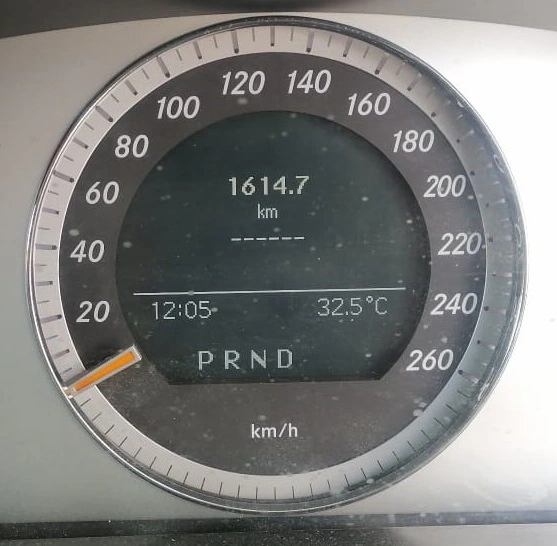
Without this, the cluster will not display the mileage and will instead show dashes (------).
Diagnostic tools like Xentry or Autel may display error codes such as B226629 or B226656
“The drive authorization data are implausible. There is an invalid signal.”
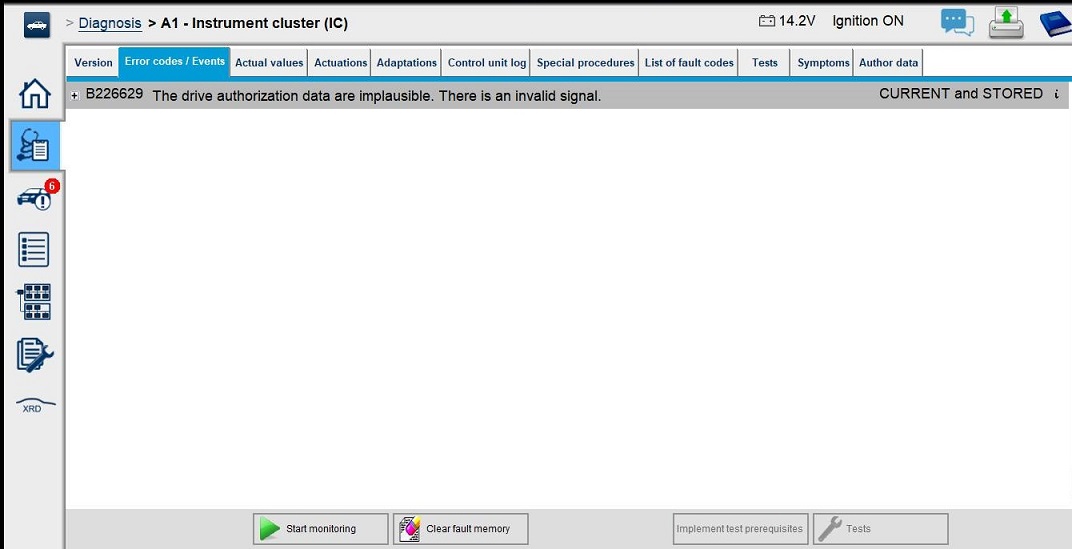
MBTools performs this process safely through the OBD port — no soldering, chip replacement, or EEPROM manipulation needed. And as an extra layer of safety, the original data is backed up to the cloud.
Prerequisites
To begin the process, make sure you have the following:
- A Windows 10 or 11 laptop connected to the internet
- A compatible VCI (Vehicle Communication Interface) such as Tactrix Openport 2.0
- MBTools app downloaded and installed
- VCI fully set up and recognized by the MBTools app
- Verify feature availability for your vehicle using your VIN
Step-by-step: Virginizing the Instrument Cluster
Once your setup is complete and your VCI is communicating with the vehicle, follow these steps:
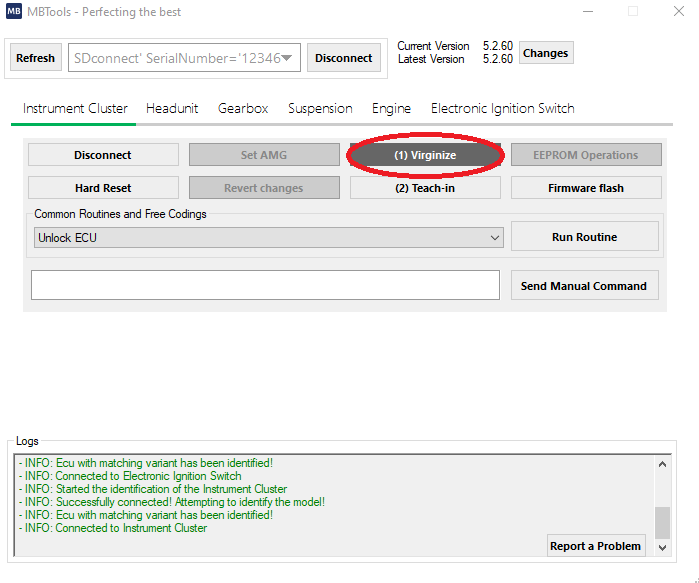
Step 1: Virginize the Instrument Cluster
- Open the MBTools App
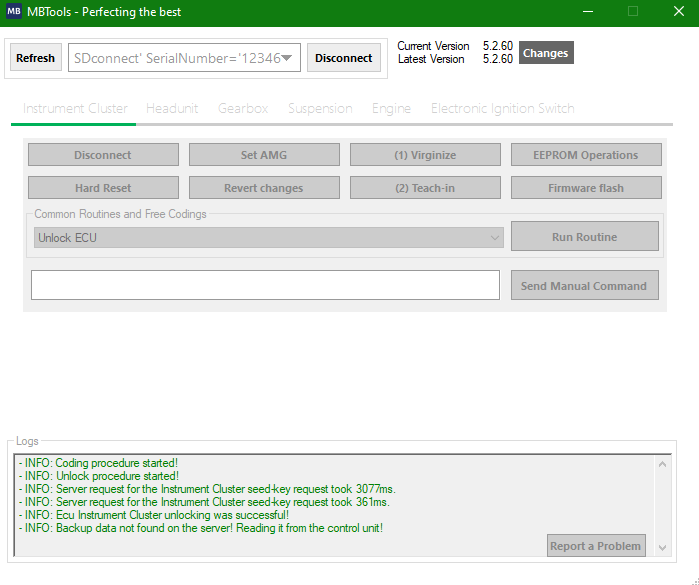
- Select the instrument cluster and click the "Virginize" button.
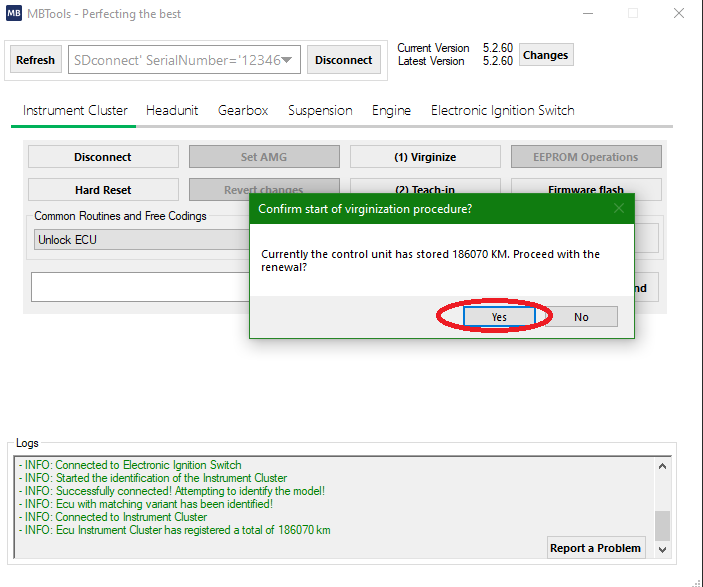
- A prompt will appear showing the current mileage stored in the cluster
- Confirm the renewal.
- The operation will start backing up the original data from your instrument cluster, and run the re-initialization procedure.
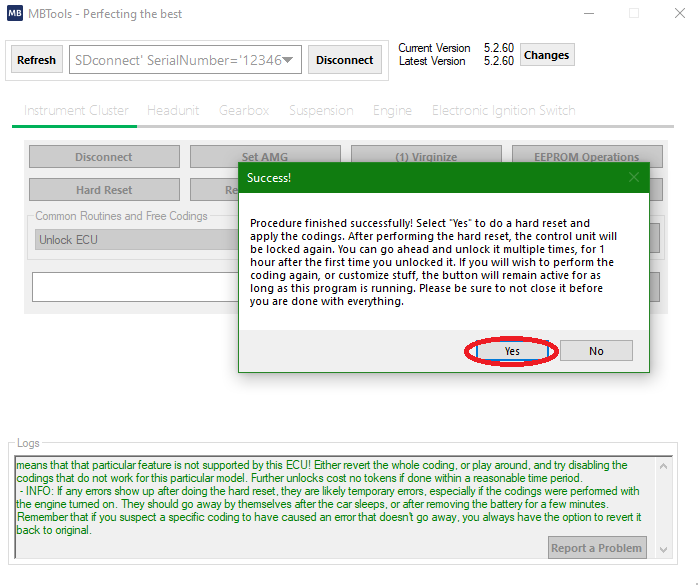
This can take anywhere between 5 to 10 minutes, depending on the instrument cluster, and the diagnostic device you are using. - Once it finishes, it will prompt you to restart the instrument cluster, so that the changes take effect.
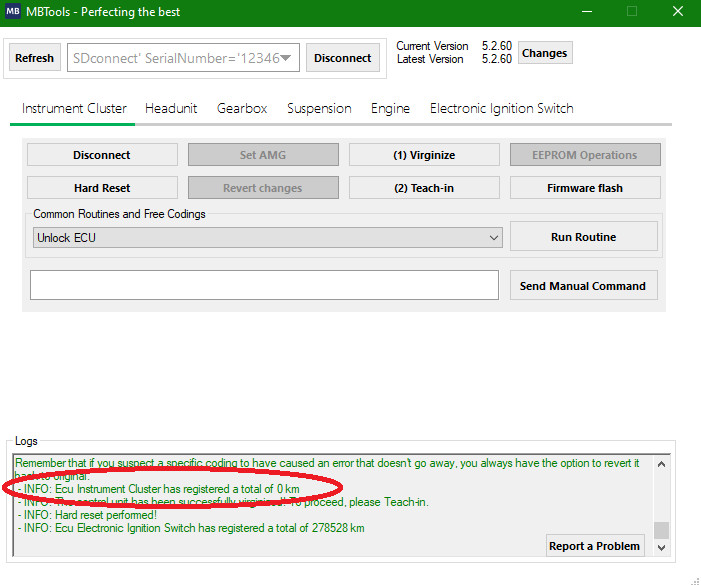
- At this point, you should see that the instrument cluster has 0 km, and it is ready to be taught in, and have the mileage matched with that of the car's electronic ignition lock.
Step 2: Teach-in the Instrument Cluster
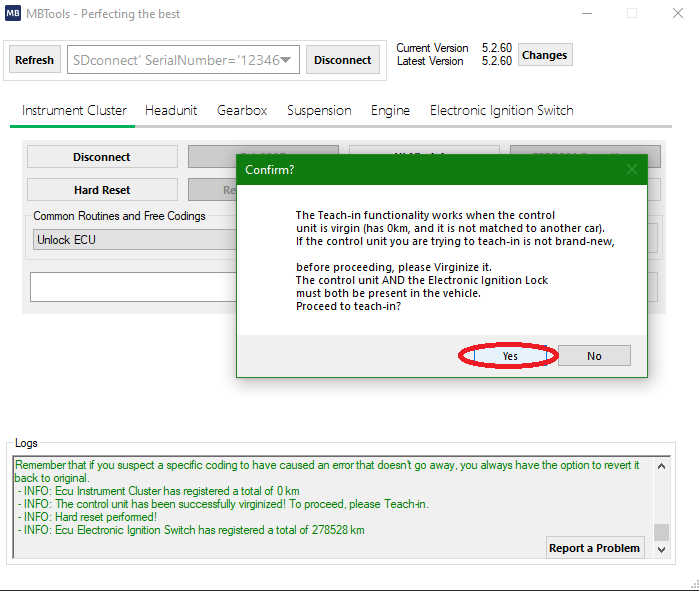
- Press the (2) Teach-in button.
- Make sure that before committing the instrument cluster is virgin, it is mounted in the car, and is able to communicate with the electronic ignition lock.
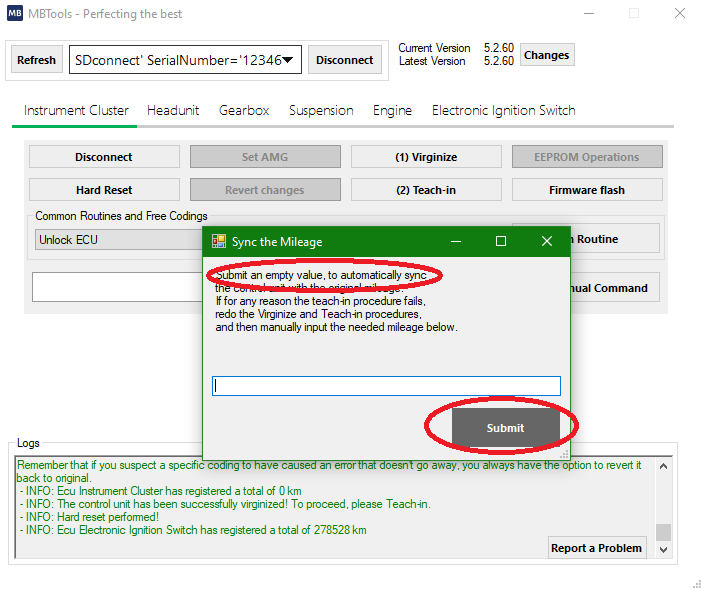
- A prompt appears, which, under normal circumstances, should be left blank.
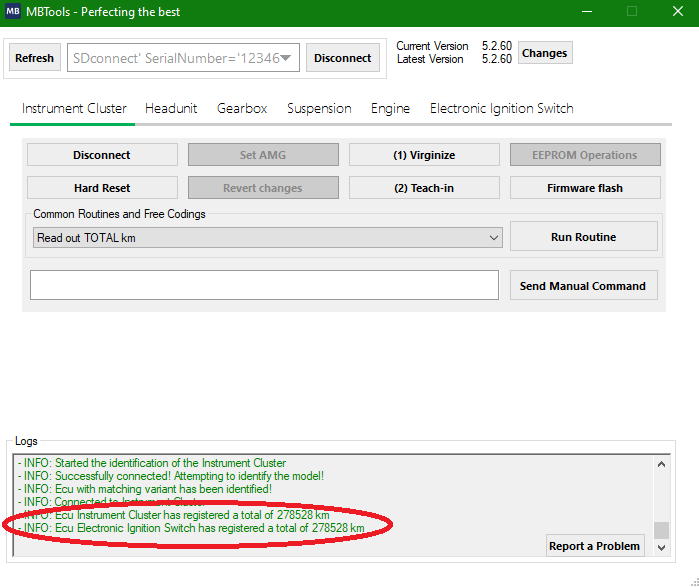
- If all requirements have been met, the mileage synchronization process of the instrument cluster should finish successfully, and if you check the kilometers in both the Instrument Cluster and the Electronic Ignition Switch, you will see that they match.
- Additionally, if you now check the instrument cluster, you will also see that the correct mileage shows up.
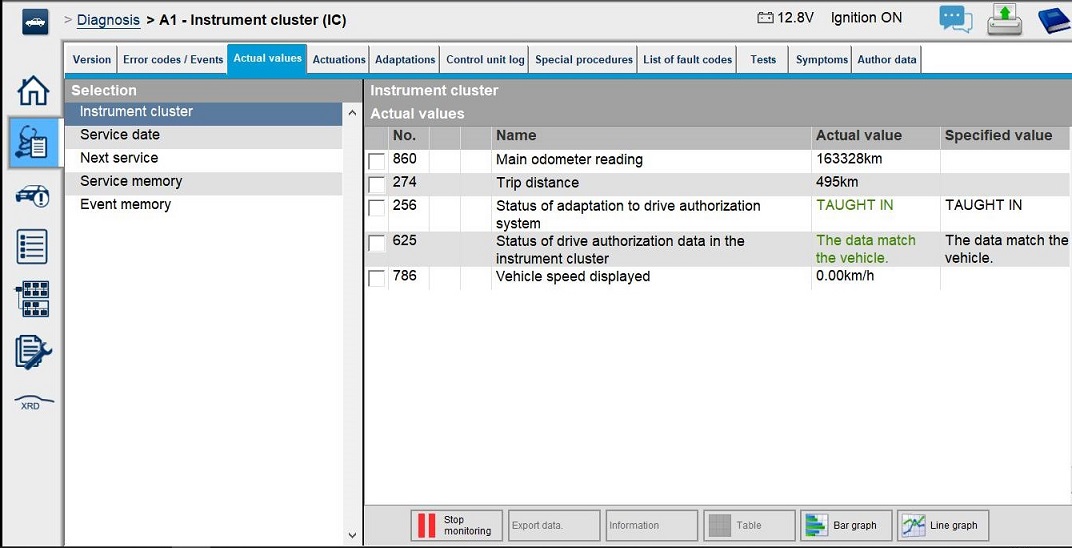
- Note: the virginization procedure is done using the best possible method, so that the teach-in procedure can be done not only using the MBTools app, as described above, but also by official dealership tools, such as Xentry Online. Checking, using diagnostic devices, will now also show the correct status of the Instrument Cluster, as being "TAUGHT-IN", and the drive authorization data in the instrument cluster matching the vehicle.
Troubleshooting
The virginization procedure fails for any reason?
- Restart the instrument cluster, disconnect, then reconnect, within the MBTools app. Alternatively, remove the negative terminal of the battery, and wait a few minutes, before reconnecting it.
The teach-in procedure fails?
- Is the instrument cluster connected to the car?
- Is there a CAN-filter present?
- This device is used for the purpose of mileage manipulation, a procedure which we condone and do not encourage anybody to do.
- This device basically blocks the communication between the instrument cluster and the electronic ignition lock, making the mileage sync to not be possible between the two control units.
- Common places where such a device can be found, are behind the instrument cluster, inside the instrument cluster, and/or around the electronic ignition lock.
- Please remove the device, and then redo both procedures. Alternatively, at the teach-in procedure, when being prompted for the mileage, manually enter it.
- Is the mileage not being reset, after the virginization procedure, and the restart?
- In this case, do the virginization procedure. When prompted for restarting the instrument cluster, press no, then proceed with the teach-in procedure.
Safety and Legal Considerations
- Always use MBTools responsibly
- This tool is not intended for mileage tampering or fraudulent activity.
- Check your local laws before performing any instrument cluster modifications
- MBTools stores backups for safety but does not assume responsibility for misuse
Frequently Asked Questions (FAQ)
Can I virginize a cluster without removing it from the car?
Yes. MBTools performs the process entirely through the OBD port, so there's no need to disassemble or physically alter the unit.
What VCIs are supported for this operation?
Tactrix Openport 2.0, VCX SE, Bosch C6, and other J2534-compatible devices are supported. Make sure the correct drivers are installed.
Will the new cluster show the correct mileage?
Yes — once virginized and taught-in, MBTools will sync the mileage with the car’s Electronic Ignition Switch (EIS).
Do I need to backup anything manually?
No. MBTools automatically backs up the original data before modifying anything, offering peace of mind.
Is this legal in my country?
Laws vary. Always consult local regulations before performing any virginization or mileage sync operations.
Disclaimer
Please note that we are in no way affiliated with Mercedes-Benz, or any of their trademarks.
We never claimed to be able to find the perfect solution.
We are simply a group of enthusiasts that came together, to help and offer easy solutions for hard problems.
We do not, in any way, assume responsibility in case you, yourself, or any person you know using the tool, is breaking the law(s).
We encourage responsible use of the provided features, and urge you to consult the applicable laws in your country.