Getting Started

A diagnostic device is the interface that connects your PC to the car, and will let you perform the codings.

There are multiple ones to choose from, depending on your budget and needs. The ones below have been tested and are known to work, but other diagnostic devices might work as well.

It is a matter of downloading the app below, install the drivers, and if the connection to your vehicle is successful, you are good to go.


Tactrix Openport 2.0 (CAN only)
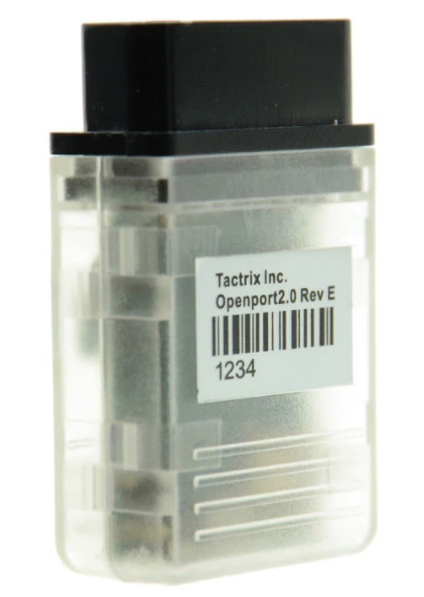
Tactrix Openport 2.0 (CAN only)

Prices from: 49 €

A budget oriented device. Can do most codings, but it's not recommended for flashing.

BMW Enet (DoIP only)
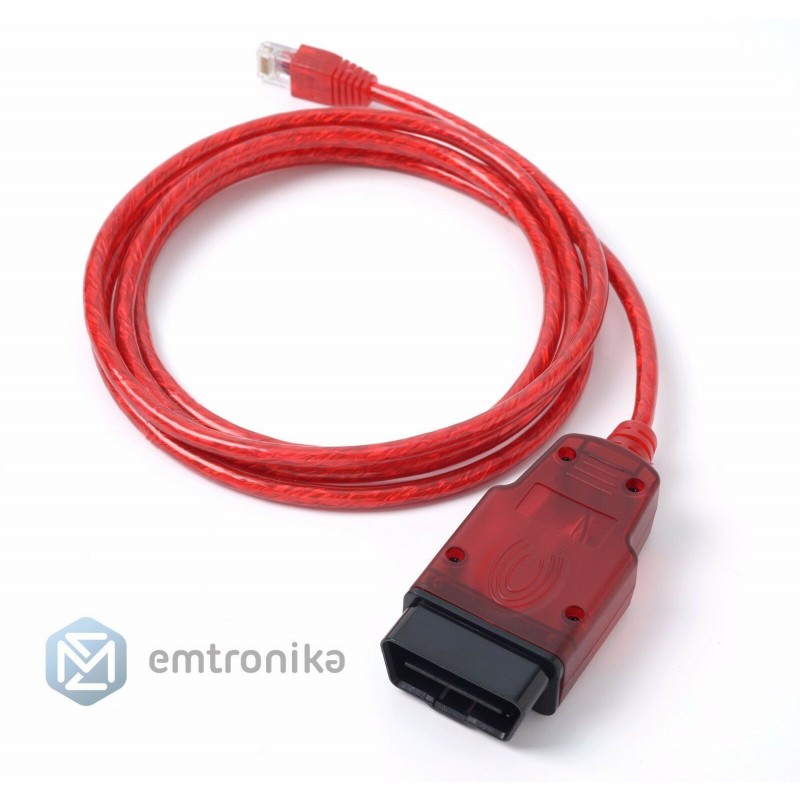
BMW Enet (DoIP only)

Prices from: 30 €

Suitable for coding Carplay, flashing headunits, coding newer Star3 vehicles (w206, w223, etc)

VCX SE - (CAN and DoIP)

VCX SE - (CAN and DoIP)

Prices from: 280 €

A budget diagnostic device that supports flashing and coding all sorts of control units, including DoIP hardware.

Bosch C6 (CAN and DoIP)

Bosch C6 (CAN and DoIP)

Prices from: 1675 €

Genuine hardware - the best options to consider, for power users.

The listed devices are sold by our trusted partner Emtronika

To be able to fully enjoy the benefits of MBTools, you will need to fulfill the following requirements:

- A Windows 10 or 11 PC

- A reliable internet connection, throughout the whole time using the MBTools app.


- You will be able to set up the app and the drivers, but the paid activation and coding buttons will only become available once you have made the purchase, at step 3.

- If you have the MBTools app running, while making the purchase, please be sure to restart it afterwards, so that your permissions are refreshed, and the buttons become available.

Check the video below for a demo of how the activation works


By clicking play, you consent to YouTube's use of cookies. See their Cookie Policy for more info. You can change your cookie settings or revoke your consent at any time through the "Manage Cookie Preferences" link.

3. Check by VIN, see what codings are offered for your vehicle, and apply them

Easily find available do-it-yourself Mercedes coding activations for your specific vehicle by entering your VIN (Vehicle Identification Number). Experiment and customize with a 1-hour grace period to perfect your settings. For comprehensive Mercedes coding lifetime solutions, visit our Promotions Page. Need assistance? Our support staff also offer set-up and activation remote assistance for an additional fee.

Enter your VIN to see available codings


Vehicle: Mercedes-Benz SLC 200 Roadster - Facelift

Chassis: r172


Find all possible control units this car might have

Your vehicle's image

Please note:

- If after checking, you don't find the coding you're looking for, listed below, it means we don't currently offer it, please do not ask for it, the answer will be the same.

- VIN check functionality is subject to Third-Party Server availability.

- This page displays the available codings we have to offer for your vehicle. To check which option codes and equipment your car already comes with, please consult our free VIN decoder

The following video is a good example of how our tool works, and it was created by one of our satisfied user AmazingRoad who offers services to end-customers, using our program.


By clicking play, you consent to YouTube's use of cookies. See their Cookie Policy for more info. You can change your cookie settings or revoke your consent at any time through the "Manage Cookie Preferences" link.

Instrument Cluster AMG Menu

Instrument Cluster AMG Menu

Description

Activate the AMG menu on the car, and customize it to show Water, Oil and Gearbox temperatures

The coding procedure takes 5 minutes.


Considerations

After enabling the AMG menu, the instant fuel usage menu is lost.

In some very rare cases, the current transmission mode (E/C/M/S) is no longer displayed. For this, please use the fix from the Common codings and routines dropdown menu in the MBTools app.

The AMG or Brabus boot image only works on a select few models.

This car has 9 speed transmission, but the AMG menu will only be able to display up to 7 (although 9 speed transmission will continue to work perfectly).


One-time activation price: 50

Instrument Cluster Mileage Synchronization

Instrument Cluster Mileage Synchronization

Description

This product fixes a common issue that occurs when you replace your car's instrument cluster. If your new cluster shows dashes instead of mileage, this solution resets the mileage to 0, allowing you to set the correct mileage from your car.

The procedure takes 5 minutes.


Considerations

We do not actively support mileage manipulation. If you want to achieve mileage other than original, a CAN filter is required separately, which we do not sell, or offer support for.


One-time activation price: 80

Disable Seat Belt Warning

Disable Seat Belt Warning

Description

This activation comes free of charge, and gives you the ability to disable the annoying seat belt warning sound.


Considerations

Please drive responsibly!

Please note that free codings come 'as is', with no support. Make sure to manually backup your codings in the MBTools app, should you want to revert back to them, later.


This coding is offered for free

Spin the Needles on Instrument Cluster Startup

Spin the Needles on Instrument Cluster Startup

Description

This activation comes free of charge, and gives you the ability to enable the animation of spinning the needles when the car is started.


Considerations

Please note that free codings come 'as is', with no support. Make sure to manually backup your codings in the MBTools app, should you want to revert back to them, later.


This coding is offered for free

Map Update

Map Update

Description

Update your Mercedes Navigation to the latest version.

The update procedure takes about 1 hour.

After buying, please generate your activation key from the Map Pin Codes page.


One-time activation price: 70

Headunit/Navi AMG Boot Logo

Headunit/Navi AMG Boot Logo

Description

Display the AMG or Maybach boot logo on your headunit.


Considerations

This is a headunit coding, and comes together with all the other headunit codings (meaning you don't need to purchase each of them individually, they are all included in the price).

Please do not confuse this with the AMG menu on your instrument cluster, that needs to be bought and coded separately!


One-time activation price: 150

Headunit/Navi AMG Car Design

Headunit/Navi AMG Car Design

Description

Enhance the look of the car displayed in the headunit, to appear with the AMG bodykit.


Considerations

This is a headunit coding, and comes together with all the other headunit codings (meaning you don't need to purchase each of them individually, they are all included in the price).

The ability to change the car design image is subject to availability within the headunit's current firmware.


One-time activation price: 150

Headunit/Navi Android Auto

Headunit/Navi Android Auto

Description

Android Auto lets you connect an Android phone to the car by wire, and use programs such as Maps, directly on the Headunit's screen.

The activation procedure takes between 5 and 30 minutes.

You do not need to make any hardware changes, or replace any modules, everything is done on the software side.


Considerations

This is a headunit coding, and comes together with all the other headunit codings (meaning you don't need to purchase each of them individually, they are all included in the price).

Please note that flashing the unit might be needed.

If that is the case, a DoIP compatible VCI, such as the BMW enet cable is required.

The flashing procedure can be carried out by the MBTools app.

Note that, according to our records, this car already originally comes with Headunit/Navi Android Auto actitivated by factory.


One-time activation price: 150

Headunit/Navi Apple Carplay

Headunit/Navi Apple Carplay

Description

Apple Carplay lets you connect an iPhone to the car by wire, and use programs such as Maps, directly on the Headunit's screen.

The activation procedure takes between 5 and 30 minutes.

You do not need to make any hardware changes, or replace any modules, everything is done on the software side.


Considerations

This is a headunit coding, and comes together with all the other headunit codings (meaning you don't need to purchase each of them individually, they are all included in the price).

Please note that flashing the unit might be needed.

If that is the case, a DoIP compatible VCI, such as the BMW enet cable is required.

The flashing procedure can be carried out by the MBTools app.

Note that, according to our records, this car already originally comes with Headunit/Navi Apple Carplay actitivated by factory.


One-time activation price: 150

Headunit/Navi Analog Engine Dials

Headunit/Navi Analog Engine Dials

Description

One of the coolest features of this HeadUnit, is the ability to display engine data, such as Kw/HP and Nm data, as well as temperatures.


Considerations

This is a headunit coding, and comes together with all the other headunit codings (meaning you don't need to purchase each of them individually, they are all included in the price).

An engine ECU update might be needed, for it to send the right signals, for the values to be displayed correctly. We can not assist with this additional procedure, should it be needed.


One-time activation price: 150

Change the map region

Change the map region

Description

If you are installing the maps of a different region, before updating, you must also code this change in the headunit.


Considerations

This functionality is available only between Europe - US - Middle-East regions.


This coding is offered for free

MBTools™ - Your Quality Aftermarket Mercedes Solution Provider Since 2019
Terms of Service | Privacy Policy | Cookie Policy
Politica de Privacidad | Aviso Legal